Apple

First Real Malware for Mac

Flashback

Flashback is the first malware (malicious software or virus) for the Mac that people should worry about. It can infect computers through a vulnerability in Java. It’s estimated that 600,000 Macs have been infected, about 1% of Macs in use. Flashback collects personal information such as bank and login information. To see if your Mac is already infected, follow the instructions from Macworld.

Unlike with Windows PCs, this phenomena is new to Macs. The closest previous infection I remember was when a torrent version of Apple iWork ’09 contained a trojan. But that just impacted people who downloaded the pirated torrent. Flashback is far worse since someone can get it by just visiting a website.

Protection

It’s easy to protect yourself against malware and viruses on a Mac. There is no need to buy anti-virus software which doesn’t really help much on a Mac. Instead, take these steps that deal with the exploits of Java and Flash.

1. Perform Software Update

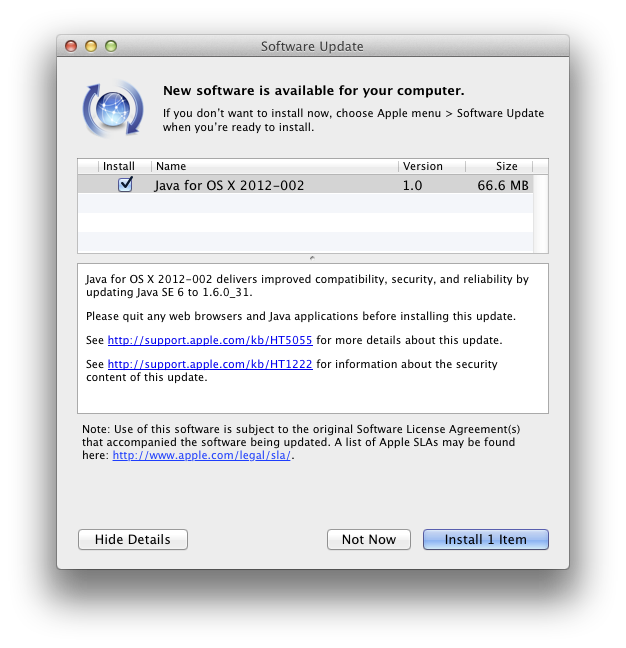
Apple’s updates automatically patch Java and remove Flashback. Open System Preferences and go to Software Update, Check Now.
2. Disable Java in any web browser you use

Safari
Go to the menu item:
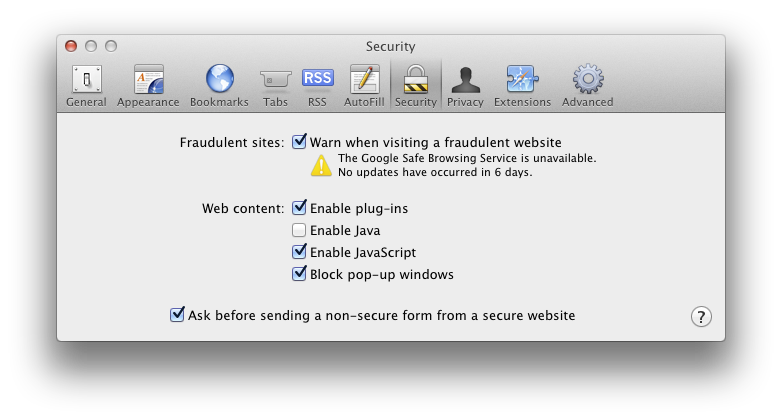
Preferences -> Security -> Web Content
Uncheck Enable Java
Chrome
Go to the URL:
chrome://plugins/
Click Disable for Java

Firefox
Go to the menu item:
Tools -> Add-ons
Click on Plugins and click Disable for the Java Applet Plug-in

3. Install a Flash Blocker

My favorite is ClickToFlash, the Safari Extension which gives you access to Flash content if you click on the Flash window. This has the additional benefit of hiding annoying Flash ads.

Another tool I use is FlashFrozen, available for $0.99 through the Mac App Store. This handles all Flash running on your computer. It is especially useful for Mac laptops which can have their batteries quickly run down by errant Flash sites.

 

UPDATE: Oracle (the owners of Java) have released their own Java updates now. If you have Java installed on your system, you should get the latest Java SE Development Kit from here:
http://www.oracle.com/technetwork/java/javase/downloads/jdk-7u4-downloads-1591156.html
After installing, go to Utilities – Java Preference. From there, drag the latest Java to the top. As of this writing, that is Java SE 7. Uncheck the older Java versions. The next time you start a program that uses Java, it will now use the newer Oracle Java that has the latest security patches.
Fax a PDF from a Mac

Faxing seems to be an ancient technology that just won’t die.  It is still embraced, often even preferred or required, by many businesses.  Most people don’t want to have to own a fax machine any more but do have to fax from time to time.  There is a modern day solution.  You can easily fax any PDF from a Mac.  And since you can convert anything in a browser to a PDF easily on a Mac, it allows you to fax almost anything you could print out.

Apple makes a USB fax modem but sadly, they’ve not maintained it so it doesn’t work on the latest Macs any more.  Fortunately, US Robotics makes a great US Robotics USB Fax Modem that is compatible with a Mac.

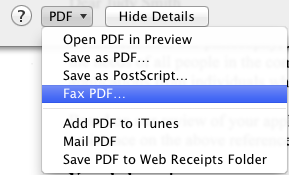
Once plugged into a Mac, you’ll notice you have gained a new option via the Print PDF menu.

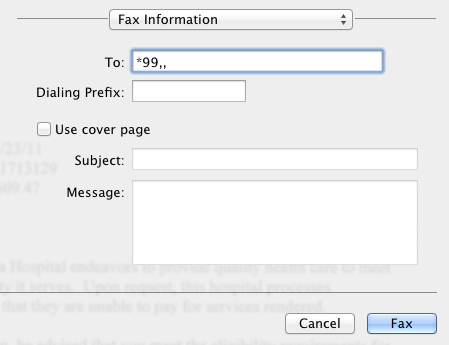
If you’re like me and have dropped your expensive home phone service for a cheaper Voice over IP phone line, then you may have a little more work to do to actually get a fax to go through.  In the case of the popular Ooma Telo Free Home Phone Service, you have to tell the line that you are about to fax so it can optimize the connection.  This is done by prepending a *99,, to the phone number you are faxing to.

Unlock SIM for International Travel

If you travel internationally, it’s nice to be able to put in a local-country SIM card for Internet and calls. This is far cheaper than International Roaming.

AT&T won’t do it

I just confirmed with AT&T that they changed their policy. They no longer unlock the SIM card on iPhones, even for customers in good standing for over a year. Compare this to Verizon that will unlock a phone after 3 months.

So if you are buying an iPhone and travel internationally, don’t chose AT&T as your carrier.

iTunes Match

Benefits

iTunes Match accomplishes a few things for me:

  1. Updates my collection to 256 kbps aac files (higher quality)
  2. Backs up my collection online (iCloud)
  3. Makes it easier to use other Apple products for my music collection without needing to download everything. This makes it easier to use a lower capacity laptop, iPhone, or iPad.

It’s worked pretty seamlessly for me and costs $25/year, although you only need one year if you just are interested in accomplishing #1 above.

Updating to 256 kbps

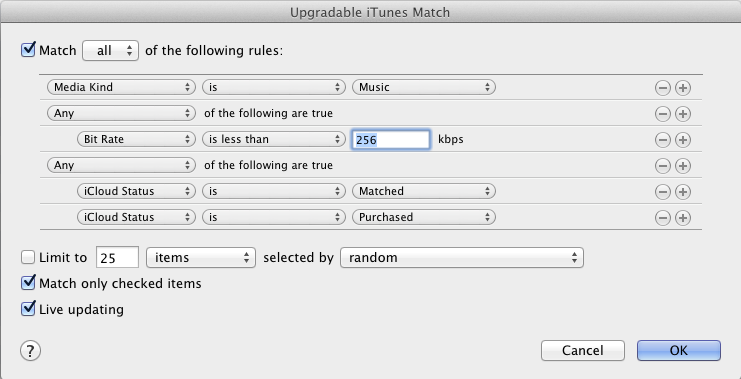
I followed the Macworld instructions to create a Smart Playlist that shows just the songs needing an upgrade (see picture). Hold down option key when clicking the plus to add the conditional rule for iCloud Matched or Purchased.

Then I selected all the files and deleted them, making sure to NOT select to delete them from iCloud. Then I downloaded the files over a couple of days.

Kindle Fire Is Disappointing

Lower Your Expectations

Wow, I had low expectations given the $199 price, but the Amazon Kindle Fire still managed to disappoint me.

Pros:

  • $199

Cons:

Hardware

  • Backlight bleeding all around the edge of the screen.
  • Power button is badly placed and I’ve accidentally shut off the Fire several times when holding it.
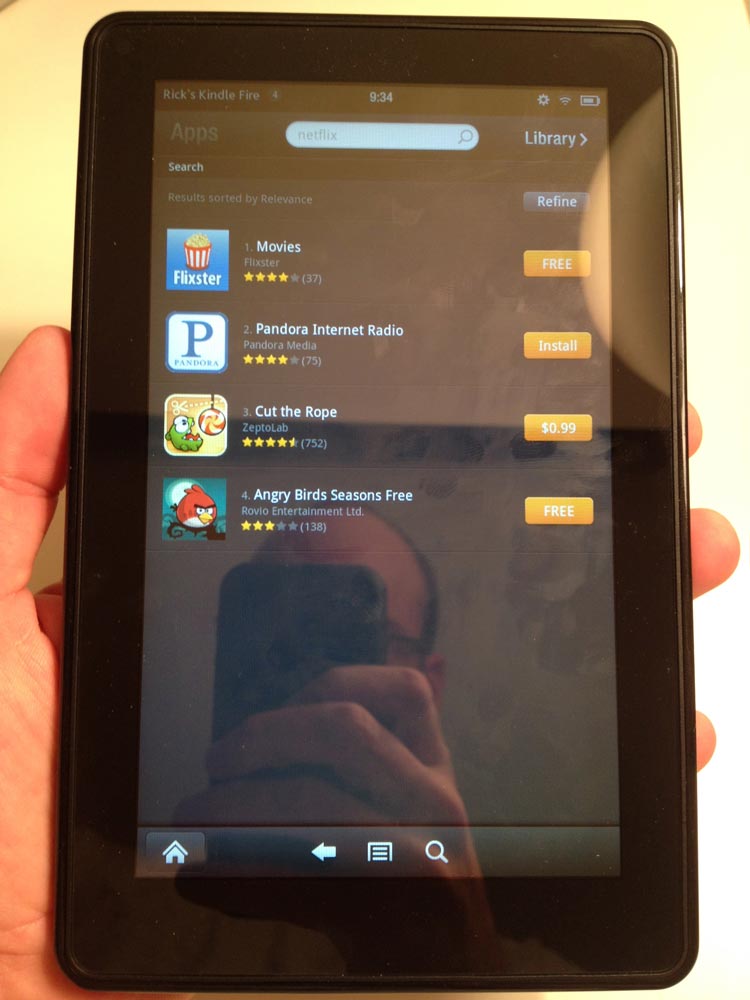
  • Super-reflective screen. Much more reflective and finger-print-showing than other tablets. (See picture)
  • Poor battery life, at least compared to the iPad.
  • 6 GB of usable space so you can’t load this up with movies. I guess Amazon wants this to be more of a streaming device. But you’re left with little space if you need to load this up for travel away from WiFi.
  • Surprisingly heavy. I suppose this is because I’m used to holding Amazon’s similar sized e-ink tablets. But when you hold the Fire, the weight is the first thing you’ll notice.
  • No mic, no cameras, no bluetooth, no SD card slot, no gyroscope (for better gaming control).
  • No hardware Home button or volume buttons. From some pages, it takes a few software button presses to get to the volume controls.

Software

  • Carousel interface for all your items is a terrible idea, made even worse by the fact that once you launch anything it goes in the Carousel and can not be removed. So you end up with a really long carousel with stuff you don’t want.
  • Inconsistent UI. For example, when you reach the end of a scroll page, some pages bounce while other pages brighten on the edge.
  • Slow UI response in many places such as pinch-to-zoom.
  • Apps crash. On each of three Kindle Fire units we tested, Angry Birds crashed on first launch. It worked after that. The browser had several crashes.
  • Flash works, but Flash videos are jerky to the point of being unwatchable.
  • Slow browser. This is especially disappointing given that Amazon promoted the speed of it’s Silk browser.
  • AppStore allows you to buy apps that don’t work properly on the Kindle Fire.
  • AppStore search doesn’t work. Searching for “Netflix” resulted in four apps, none of which were the Netflix app. (See picture)
  • AppStore has very few apps compared to other Android devices with Google Market.
  • The magazines are just scans of the magazine. These aren’t nice PDFs with embedded fonts. So when you zoom, the text gets fuzzier. The aspect ratio of 16×9 doesn’t fit magazines well. There is empty space at the top and bottom when viewing the full page.
  • There is one odd thing I haven’t figured out yet. When scrolling a web page, it looks as if the page tilts in the direction you are scrolling. I haven’t been able to capture this on camera. I can’t tell if this is a UI decision or a weird screen drawing or refresh issue.
Alternatives

I’m not just being an Apple fanboy here. While both the iPod Touch are iPad are far superior to the Fire, so are the Samsung Android devices which are faster and have a better UI. And if you want to just read, the e-ink Kindles are great. The Kindle Fire is just not a fully developed product.

Scroll to Top