The days of downloading media through traditional peer-to-peer (P2P) file sharing are fading. Today, the “state of the art” for accessing and downloading content has moved to a faster, more secure method that happens almost entirely in the cloud.
This new ecosystem prioritizes speed and security over complexity:
The Cloud is the New Download Hub
The most significant change is the rise of Debrid Services (like Real-Debrid). Instead of exposing their home IP address while downloading, users offload the risk and bandwidth strain to remote cloud servers. These services instantly access massive libraries of content, converting risky files into secure, high-speed HTTP downloads.
The Key Tools Powering the Shift
Whether you want to stream or permanently download a file, the process relies on linking several specialized tools:
Stremio: Serves as the modern, user-friendly interface for browsing content that links directly to the Debrid server.
qBittorrent: Still used by some as a source or search engine for finding the original files, which are then quickly routed to the Debrid cloud.
JDownloader 2: The preferred tool for downloading files from the Debrid server back to a local computer. It maximizes download speed by using multiple connections.
VPN (NordVPN, etc.): Remains a core security measure, protecting user privacy during the initial search phase and enhancing security while using Debrid services.
This combination of tools defines the current state of media consumption: a system designed for maximum convenience, high-speed delivery, and a minimal footprint on the user’s home network.
Some iPhone users run into a frustrating issue: you send an email from Gmail using the built-in Apple Mail app, it briefly shows up in Sent, and then—minutes later—it moves into Trash or disappears from the Sent folder entirely.
This isn’t a Gmail glitch.
It’s caused by how the iOS Mail app maps Gmail folders.
What’s Actually Happening
Gmail uses its own IMAP folder structure (like [Gmail]/Sent, All Mail, etc.). Apple Mail sometimes maps outgoing messages to a local “On My iPhone” Sent folder instead of Gmail’s actual Sent folder. When Gmail syncs, the mismatch can cause the message to be moved or treated like a deleted or duplicate item.
This issue is well-documented across user forums, and many people experience the same disappearing-sent-mail behavior.
The Simple Fix
Skip Apple Mail entirely for Gmail.
Install the Gmail app from the App Store. Open Settings → Gmail → Default Mail App and set Gmail as the system-wide default. Use the Gmail app for sending and receiving email going forward.
The Gmail app uses Google’s own folder mapping and sync engine, so sent messages always go to the correct place—and stay there.
Why This Matters
Whether you’re running a small business, doing tech support, or managing client communication, losing track of sent messages can cause follow-up failures and confusion. Using the Gmail app ensures consistent, predictable behavior across all your devices.
A $32 “deal” raises serious questions about platform responsibility
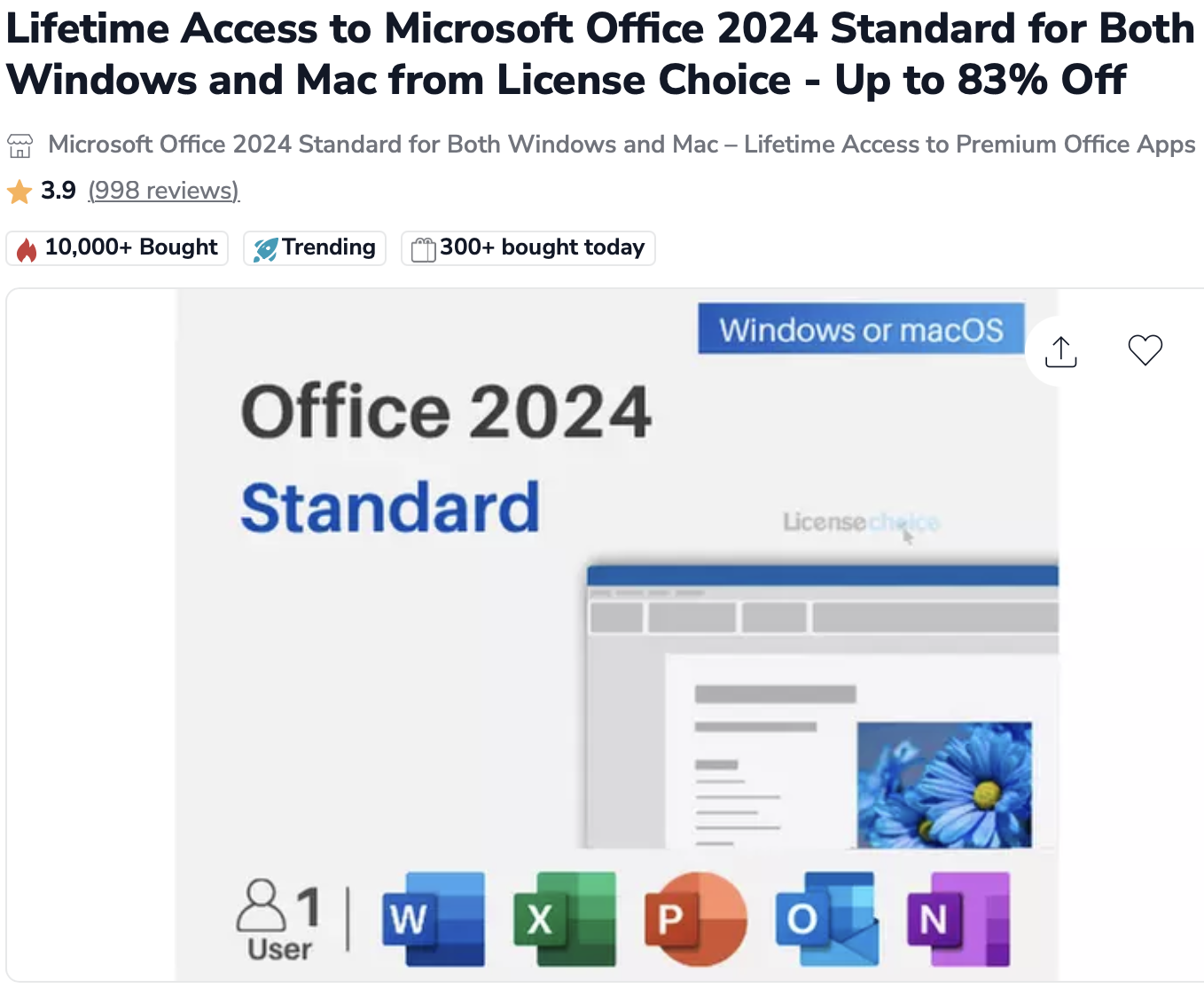
When searching Google for discounted Microsoft Office licenses, Groupon appears near the top of results. The daily deals platform has become a major marketplace for software licenses through third-party sellers. But a recent purchase reveals a troubling gap in how Groupon vets what’s actually being sold on its platform.
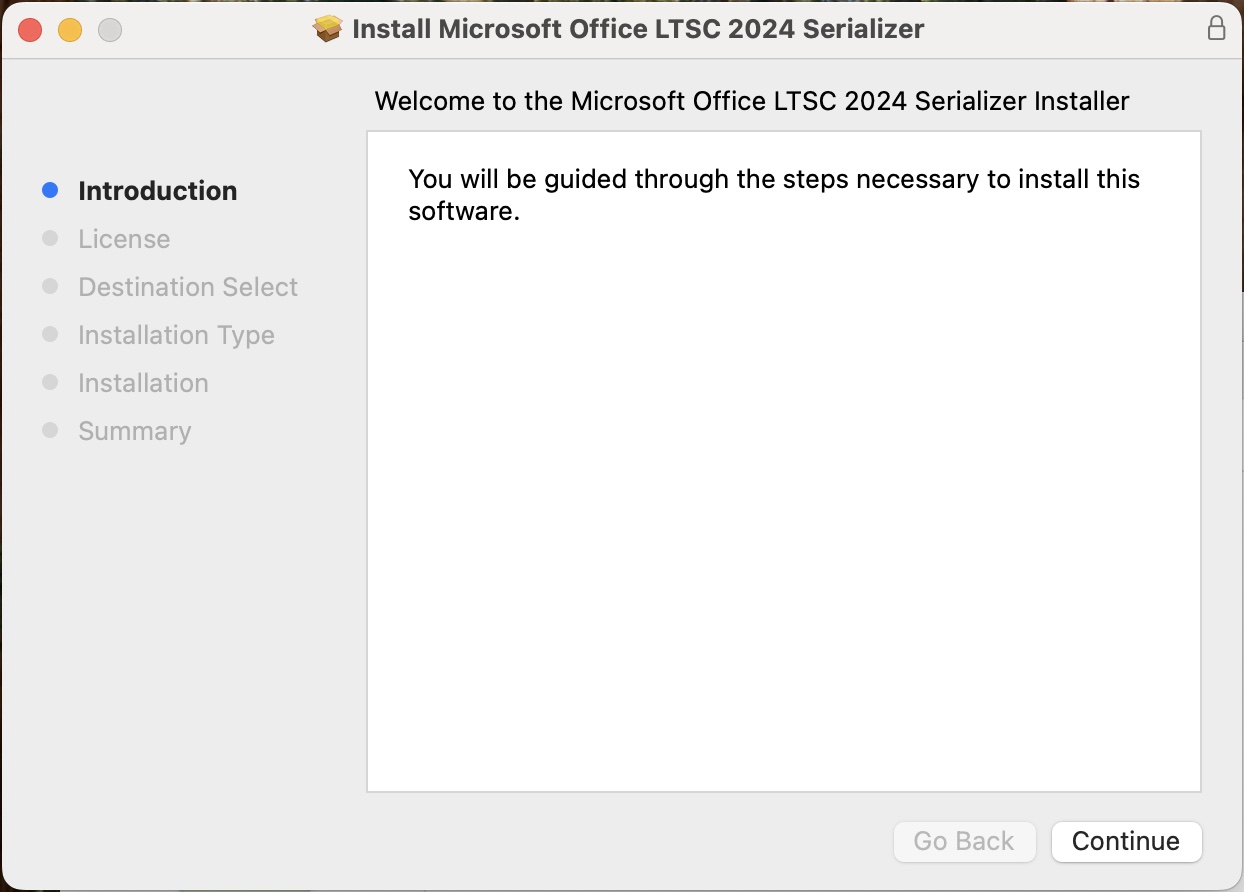
I recently witnessed someone purchase what was advertised as Microsoft Office 2024 through a third-party seller on Groupon for $32. What they received wasn’t a legitimate product key or license from Microsoft—the standard for legal Office purchases. Instead, the package included only an activator tool, commonly known as a “serializer.”
The Red Flags
Legitimate Microsoft Office purchases come with a product key and license agreement tied to your Microsoft account. What this buyer received was fundamentally different: software designed to bypass Microsoft’s activation system entirely. The price point—$32 for software that retails for hundreds of dollars—should have been the first warning sign.
Groupon’s Marketplace Responsibility
To be clear: Groupon didn’t create or directly sell this product. Like Amazon or eBay, Groupon operates as a marketplace platform where third-party sellers can list items. But unlike a neutral platform, Groupon actively promotes these deals, takes a commission on each sale, and presents them under the trusted Groupon brand.
This raises uncomfortable questions: What vetting process does Groupon use for software listings? How does a deal offering activation tools instead of legitimate licenses make it through their approval process? And why does Groupon rank so prominently in search results for consumers looking for legitimate Office licenses?
The Broader Issue
The grey and black markets for software keys are well-documented problems. Volume license keys, educational licenses, and cracked activation tools regularly appear on discount marketplaces. Microsoft has entire teams dedicated to combating software piracy, yet these questionable deals persist on major platforms.
When a platform like Groupon—with significant name recognition and consumer trust—hosts these sellers without apparent scrutiny, it lends legitimacy to transactions that may not deserve it. Consumers searching for deals have no easy way to distinguish between legitimate volume licensing resellers and sellers offering something else entirely.
What Consumers Should Know
If you’re considering buying discounted Microsoft Office:
Legitimate licenses come with product keys, not activation tools or “serializers”
Prices far below retail are a red flag – if Office 2024 retails for $250+, a $32 version deserves skepticism
Check the seller carefully – research the third-party vendor, not just the platform
Understand the difference between legitimate volume licensing resellers and grey market key sellers
When in doubt, buy directly from Microsoft or authorized retailers
The Bottom Line
Groupon profits from every transaction on its platform, including those from inadequately vetted third-party sellers. While the company may not be directly selling questionable software, it’s providing the storefront, the payment processing, and the veneer of legitimacy.
In an era where platform responsibility is under increasing scrutiny, marketplace operators can’t simply claim they’re neutral intermediaries. They have an obligation to ensure that what’s being sold under their brand meets basic standards of legitimacy—especially when it comes to software licensing.
Consumers deserve better. And platforms like Groupon should do better.
If you’re tired of spam calls interrupting your day and endless hold music draining your patience, iOS 26 has arrived with two game-changing features that transform how you handle phone calls. Apple’s latest update includes Call Screening and Hold Assist—tools designed to give you back control over your phone.
Call Screening: Your Personal Gatekeeper Against Scammers
Call Screening is iOS 26’s answer to the relentless wave of telemarketing and scam calls that plague smartphone users. Instead of your phone ringing every time an unknown number dials in, this feature creates a protective barrier between you and potential nuisances.
How It Works
When someone who’s not in your contacts calls, a Siri-style voice automatically answers and asks them to provide their name and reason for calling. The information is transcribed to text and shown to you, allowing you to decide whether to accept, decline, or ask for more information. The beauty of this system? You never have to engage directly with the caller unless you choose to.
For telemarketers and scammers, this creates an immediate obstacle. Robocalls and spam operations typically can’t interact with the screening prompts effectively, making this feature particularly powerful at filtering out unwanted calls.
Setting It Up
Call Screening isn’t enabled by default—you need to turn it on yourself. Here’s how:
Update your iPhone to iOS 26 (available for iPhone 11 and newer models)
Open Settings, then go to Apps
Tap Phone
Scroll to “Screen Unknown Callers”
You’ll see three options: “Never” (call screening off), “Ask Reason for Calling” (screening enabled), or “Silence” (unknown calls go straight to voicemail with transcription).
Screen Unknown Callers
Real-World Impact
The results can be dramatic. After leaving this on for a few days, my number of spam calls has dropped dramatically. The feature has been described as bringing “pure bliss” to iPhone users weary of constant interruptions.
Hold Assist: Never Wait on Hold Again
While Call Screening protects you from unwanted incoming calls, Hold Assist tackles the other phone frustration we all face: being stuck on hold with customer service.
How It Works
Hold Assist automatically kicks in when you’re placed on hold during a call. Your iPhone detects the hold music and offers to wait for you. If you accept, your phone monitors the line in the background while you go about your day. When a real human picks up, you receive a notification alerting you to return to the call.
Unlike Call Screening, Hold Assist requires no setup—it works automatically from the moment you install iOS 26, and it’s available on all devices that support the update, not just Apple Intelligence-enabled phones.
The Convenience Factor
This feature is especially valuable when dealing with airlines, insurance companies, or tech support lines where wait times can stretch into hours. Instead of sitting by your phone listening to elevator music, you can respond to emails, make dinner, or do literally anything else productive.
Privacy First
Both features process information on-device, meaning your privacy isn’t compromised by sending data to cloud services. Everything happens securely on your iPhone.
The Bottom Line
iOS 26’s calling features represent Apple’s most significant phone improvements in years. Call Screening helps you avoid distractions, protect your privacy, and filter out robocalls and scams before they ever reach you. Meanwhile, Hold Assist saves you countless hours of listening to repetitive hold music.
If you haven’t updated to iOS 26 yet and you’re constantly battling spam calls or lengthy customer service wait times, these features alone make the upgrade worthwhile. In an era where our phones do everything from AI assistance to mobile payments, it’s refreshing to see Apple innovating on the most fundamental function: actually making and receiving phone calls.
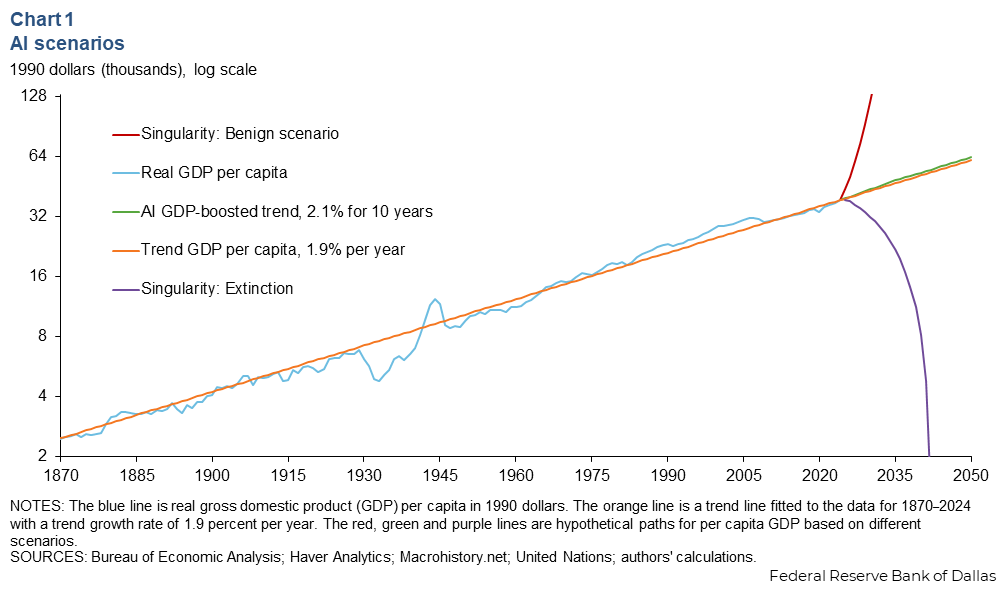
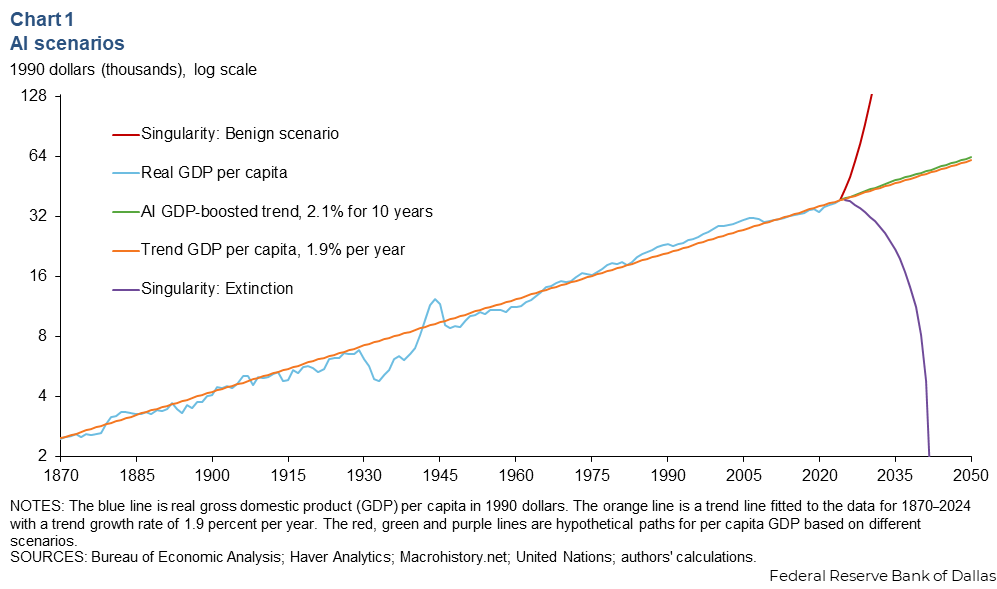
We’re living through a technological revolution that could end in utopia, normalcy, or extinction. If that sounds dramatic, consider this striking chart from the Dallas Federal Reserve that maps three wildly different futures based on how AI develops. One line shows modest GDP gains. Another rockets toward post-scarcity abundance. The third plummets to zero—representing human extinction from misaligned AI. This isn’t science fiction. It’s economic modeling from one of America’s most conservative institutions.
The Godfather of AI Issues a Warning
In this essential interview with Jon Stewart, Geoffrey Hinton—the “Godfather of AI” who won the 2024 Nobel Prize in Physics for pioneering neural networks—explains why even their creators don’t fully understand these systems. When Stewart asks if AI systems can make decisions based on their own experiences, Hinton replies: “In the same sense as people do, yes.” Hinton believes that AI will develop consciousness and self-awareness, and when asked if humans will become the second most intelligent beings on the planet, responds simply: “Yeah.” This isn’t speculation from a fringe theorist. This is the man whose work made modern AI possible, and he left Google specifically to warn about what he helped create.
Why the Engineers Are In Over Their Heads
If Anybody Builds It, Everybody Dies: Why Superhuman AI Would Kill Us by Eliezer Yudkowsky and Nate Soares exposes a disturbing paradox: the people who best understand AI’s existential risks—including OpenAI’s CEO, Google DeepMind executives, and Turing Award winners—are the same ones accelerating toward them in what the book calls a “suicide race.” The engineers building these systems are brilliant and well-meaning, but they can’t explain what happens inside large language models or control what these systems ultimately want. Yudkowsky himself inspired OpenAI’s founding, a move his own institute now views as having “backfired spectacularly.” The book’s core warning: by the time the danger becomes obvious to everyone, it will be too late.
Policymakers Are Starting to Ask Questions
While researchers warn about existential risk, Senator Bernie Sanders is addressing AI’s immediate economic impact, warning that nearly 100 million U.S. jobs could vanish within a decade. His Senate report proposes solutions including a “robot tax” and reduced work weeks. Whether you agree with specific proposals or not, the fact that policymakers are finally engaging with these questions matters—because the people building AI are telling us they don’t have all the answers.
The Dallas Fed chart shows we’re not choosing between similar futures—we’re choosing between radically different outcomes for civilization. Watch the Hinton interview. Read the book. And demand that the conversation about AI’s future includes more voices than just those racing to build it. The window to get this right is closing.