Adding iTunes Next Track Keyboard Shortcut for Logitech Easy-Switch Bluetooth Keyboard
The new Logitech Easy-Switch Keyboard
Step 1 – Create a new Service for iTunes Next Track via automator
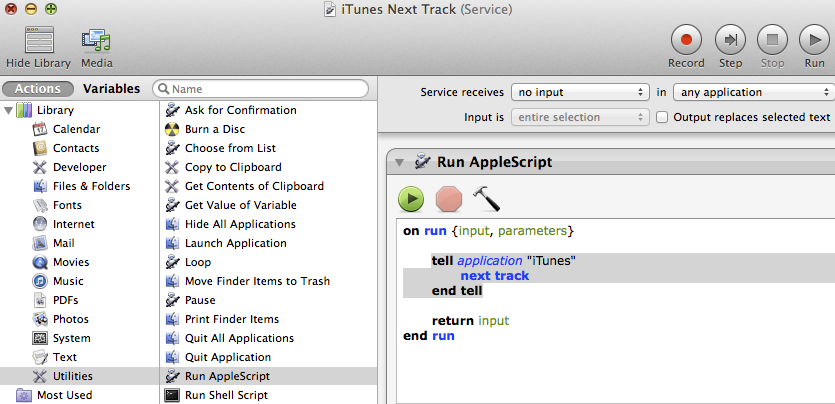
Launch the Automator app and create a new Service. In that service, Run AppleScript and select no input for what the service receives. The AppleScript tells iTunes to go to the next track. Save the service as iTunes Next Track. You can create a new service and do the same for iTunes Previous Track. It is exactly the same process except change the AppleScript “next track” to “previous track”.
Step 2 – Define the Keyboard Shortcut
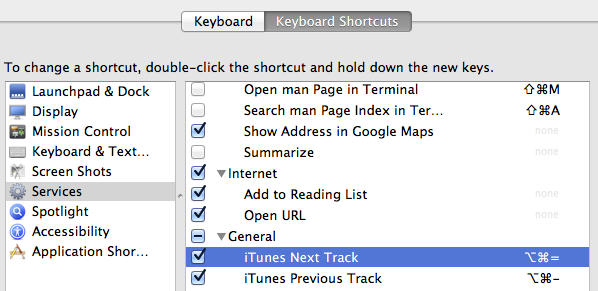
Your new Services should appear under Keyboard Shortcuts in System Preferences. They are at the bottom of the Services list. Here you can select the shortcut and then enter the keyboard shortcut you want to use. In my case, I chose to use “option command =” because the = key also has a + on it so + to go next track and – to go previous track. You must choose this shortcut wisely or it may not work. If an app that has focus has the same shortcut, it will overrule this one so you need to choose something that doesn’t seem present in the apps you are using. That’s part of why I had to use “option command” because just one of those with = is already in use in some programs I use.
Fortunately, the play/pause and volume buttons are still there so those don’t need to be re-created on the Logitech Easy-Switch Keyboard. Even though I now have to hit 3 keys at once instead of just the next button, the Logitech Easy-Switch Keyboard is the best wireless keyboard for the Mac.