

If you copy music into your iTunes library, there is a setting in iTunes that will make it easier to deal with your library.
Consolidate Library
Let’s take an example. By default, when you take MP3s on a USB drive and drag them into iTunes, the music will show up in iTunes. However, iTunes is still using the files that are located on your USB drive. As soon as you remove the USB drive, those songs in the iTunes library will have an exclamation point next to them and not be playable.
The problem has to due with the “Consolidate Library” feature. Consolidating the library moves all your music that is in the iTunes library to the iTunes folder. This keeps everything together. Oddly, this feature is not on by default.
Solution
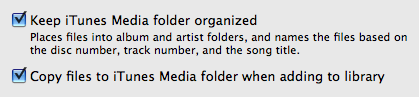
If you want to avoid this problem and keep iTunes organized automatically, go to:
For iTunes Windows: iTunes > Edit > Preferences > Advanced tab
For iTunes Mac: iTunes > Preferences > Advanced tab
Make sure “Keep iTunes Music folder organized” is checked
Make sure “Copy files to iTunes Music folder when adding to library” is checked
You are my freaking savior!
omg! you have made my dad! ive been trying to figure this out for hours! THANK YOU!!!
THANK YOU SOO MUCH. This was a great help
Thank you soooo much!!! This saves soooo much time and energy!
THANK YOUUUU I had to restart my itunes but it worked very good
I’ve done this however it still seems to need the USB in to listen to it?
If it still needs the USB, then the files haven’t moved to your local hard drive.
Thank you so much man
You Rock! Thank you so much! You would think itunes would have this info under thier help menu!
I want to burn my LP’s to a CD. I have an Ion turntable that can pipe LP’s to my computer via the USB port. From here I am stuck how to burn this music to a CD
i still can only hear them when my thumb drive is in my pc. so i see that i need to have them on my hard drive< how do i do this.. rookie statues…thanks
This is great! Note that with the latest version of iTunes (as of 12/7/2012), there is no longer an “Edit” menu. You go directly to “Preferences” from the menu that comes up when you click on the little half-shaded square in the upper-left-hand corner of iTunes.
thank you i didnt have a clue what to do !!!!
Thankyou you helped so much 🙂
you are the absolute best!! Thanks!!