DVD Regions & Formats
An Annandale, VA client is moving to France for a year assignment with his family. He wants to be able to play his kids’ favorite DVDs for them on a French TV when he is there. Will this work?
Not easily, for two reasons:
- NTSC/PAL: The video on DVDs from the US & Canada is in the NTSC format which uses 720X480 resolution and displays 30 frames per second. European video is in the PAL format which uses 720X576 resolution and displays 25 frames per second.
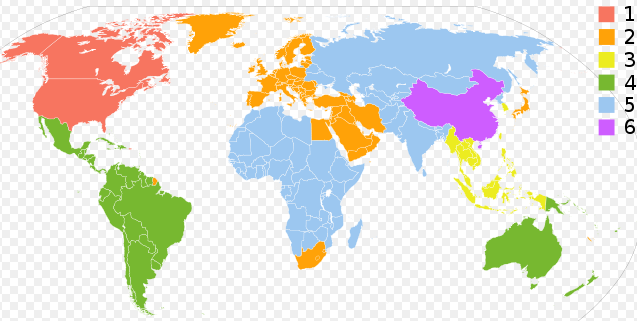
- DVD Regions: DVDs have region codes so that they only play in DVD players sold in that region. The US is Region 1, while Europe is in Region 2. See the Wikipedia DVD Region information.
Work Arounds
There are a couple of ways to address these limitations:
Get a friendly DVD player
Several DVD players can be set up to be region-free by unlocking them with an unlock code entered with the remote control. This code simply allows the user to change the factory-set configuration flag to another region, or to the special region “0” which can play any region. See the videohelp.com/dvdhacks site to find codes to make DVD players region free and to find out if a particular player can be set to region free.
Many DVD players can play both NTSC/PAL standards. You will need to check the manufacturer information or search online to determine if a particular DVD player can read and display both formats.
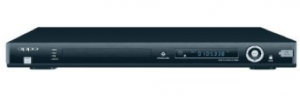 Oppo
Oppo
There are many brands of DVD players including dirt-cheap DVD players which should work. The AVS Forum DVD Section also has a lively discussion of the best DVD players available.
Most of these DVD players are rated for 110-240 volts, meaning that they can be plugged into a US (110 volt) or European (220 volt) outlet, with only an adapter needed for the plug to fit. Otherwise, a larger transformer will be needed to step up or step down the voltage.
Play Video Files created from Handbrake
Most DVD players will also play back individual backed-up or ripped video files, as we described how to make with Handbrake. You can burn these files to a CD or DVD. This will get rid of the DVD region issue because the Handbrake-created files are not region specific. It will also allow you to put more video on a disk because the files are compressed with Handbrake. Cartoons, because they have few colors, can be highly compressed without a noticeable impact on quality. That allows you to burn many cartoons onto one disk.
While it’s not made to work out of the box, the limitations of format and region encoding can be overcome with a little work.
 DVD Flick is my favorite of the two. It lets you add menus, subtitles, and custom audio tracks. It works with 45 different file types.
 , their new top-of-the line version. This box can now send high definition video over a local network.