Flashback
Flashback is the first malware (malicious software or virus) for the Mac that people should worry about. It can infect computers through a vulnerability in Java. It’s estimated that 600,000 Macs have been infected, about 1% of Macs in use. Flashback collects personal information such as bank and login information. To see if your Mac is already infected, follow the instructions from Macworld.
Unlike with Windows PCs, this phenomena is new to Macs. The closest previous infection I remember was when a torrent version of Apple iWork ’09 contained a trojan. But that just impacted people who downloaded the pirated torrent. Flashback is far worse since someone can get it by just visiting a website.
Protection
It’s easy to protect yourself against malware and viruses on a Mac. There is no need to buy anti-virus software which doesn’t really help much on a Mac. Instead, take these steps that deal with the exploits of Java and Flash.
1. Perform Software Update
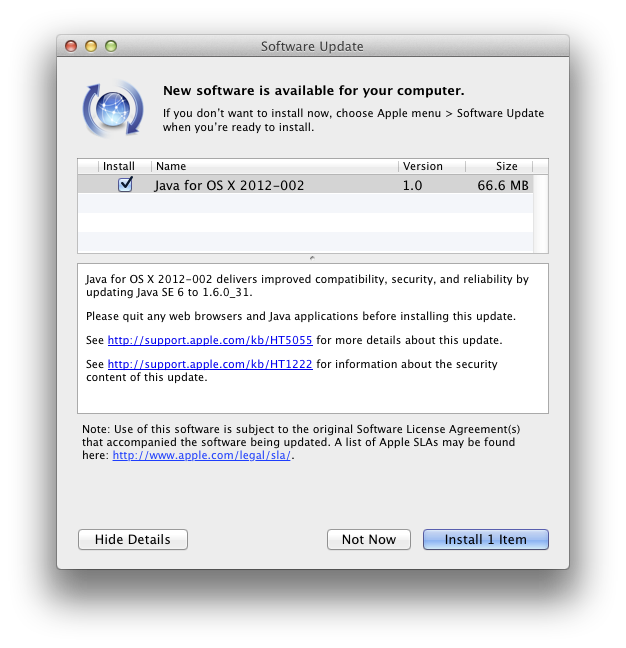
Apple’s updates automatically patch Java and remove Flashback. Open System Preferences and go to Software Update, Check Now.
2. Disable Java in any web browser you use
Safari
Go to the menu item:
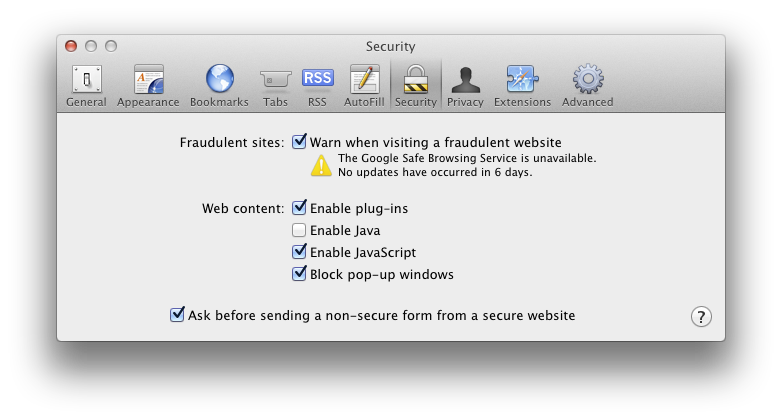
Preferences -> Security -> Web Content
Uncheck Enable Java
Chrome
Go to the URL:
chrome://plugins/
Click Disable for Java

Firefox
Go to the menu item:
Tools -> Add-ons
Click on Plugins and click Disable for the Java Applet Plug-in

3. Install a Flash Blocker
My favorite is ClickToFlash, the Safari Extension which gives you access to Flash content if you click on the Flash window. This has the additional benefit of hiding annoying Flash ads.

Another tool I use is FlashFrozen, available for $0.99 through the Mac App Store. This handles all Flash running on your computer. It is especially useful for Mac laptops which can have their batteries quickly run down by errant Flash sites.

UPDATE: Oracle (the owners of Java) have released their own Java updates now. If you have Java installed on your system, you should get the latest Java SE Development Kit from here:
http://www.oracle.com/technetwork/java/javase/downloads/jdk-7u4-downloads-1591156.html
After installing, go to Utilities – Java Preference. From there, drag the latest Java to the top. As of this writing, that is Java SE 7. Uncheck the older Java versions. The next time you start a program that uses Java, it will now use the newer Oracle Java that has the latest security patches.
 . The problem is that the eject key doesn’t work for these drives.